Using RQL for Metadata
RQL can be used to query against custom-created metadata fields in Reach Engine. Any and all metadata fields will be queryable by Reach Engine and how you search against them depends directly on the data type of the metadata field (String, Boolean, Date, etc..)
Metadata fields can be queried in RQL by using their distinct ‘name’ field or keyValue rather than using the user interface ‘Display Name’.
The following metadata can be used in RQL statements
- Numbers ( =, !=, >, >=, <, <=, is blank, is not blank)
- Asset ID
- Frame Rate
- Duration
- Channel Count
- Sample Depth
- Sample Rate
- Checksum
- File Size (bytes)
- Height
- Width
- Bitrate
- Start Timecode
- End Timecode
- Picklists
- Status
- Available / Archived / Locked
- Time Format (Timelines)
- SMPTE
- Time Of Day
- Timecode Format
- Drop Frame
- Non Drop Frame
- Aspect Ratio
- 16:9
- 4:3
- Project Type
- Premiere
- Other
- ...
- Orientation
- Portrait
- Landscape
- Status
- Strings / Text
- Source Path
- Mezzanine Path
- Proxy Path
- Source File Extension
- Mezzanine File Extension
- Proxy File Extension
- Video Container
- Codec
A variety of “operations” can be used in combination with the values to build your complex query
BOOLEAN – hasProxy
hasProxy = true OR hasProxy = false
hasProxy is null OR hasProxy is not null
TEXT(SMALL) – hLSURL *SMALL vs LARGE Text types query the same
hLSURL = ‘reach.com’ OR hLSURL like ‘reach.com’
hLSURL is null OR hLSURL is not null
CALENDAR – holiday
holiday lt ‘12-27-2019’ OR holiday gt ‘12-27-2019’
holiday lte ‘12-27-2019’ OR holiday gte ‘12-27-2019’
holiday between ‘12-24-2019’ and ‘12-26-2019'
holiday is null OR holiday is not null
LINK - homeVideoLicensingYoutubeURL
homeVideoLicensingYoutubeURL is null
homeVideoLicensingYoutubeURL is not null
homeVideoLicensingYoutubeURL.title like 'mylinkname'
homeVideoLicensingYoutubeURL.url like 'www.levelsbeyond.com'
PICKLIST – holiday *SINGLE vs. MULTIPLE picklist types query the same*
Picklists are handled a little differently via RQL and can be queried in two different ways. Either by the Display Name of the picklist value or by the ID or Key of the picklist value.
For example within the Holiday picklist the Display Name ‘Christmas’ has an ID value of ‘05355d15a40c41fbb2d4bfc4312267dd’ so here are some example queries:
holiday = '05355d15a40c41fbb2d4bfc4312267dd'
holiday like ‘Christmas’
holiday is null OR holiday is not null
Below are some specific examples of RQL using the available values along with restrictions on where these values may NOT be applied.
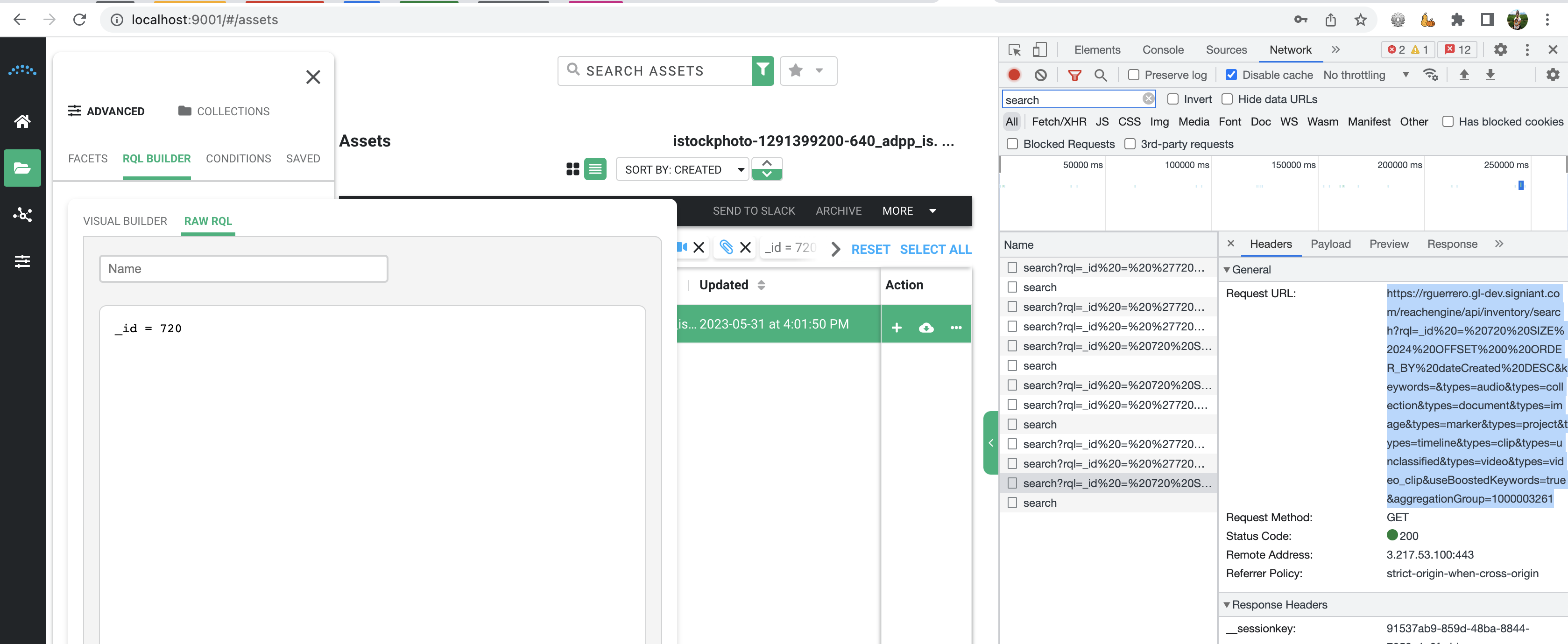
ID (Reach Asset ID)
- _id = 20460
RQL Queries available for Timeline, Image, Video, Timeline, Collection, Audio, Project, Marker, Video Clip, Document Reach Data
Frame Rate
RQL Queries available for:
- Timeline Display Frame Rate (Denotes Framerate of the Timeline when Played in the Player)
- displayFramerate = 29.0
- Timeline Target Frame Rate (Denotes Framerate of the Timeline)
- targetFramerate = 'FR_29_97'
- Note that this type of Frame Rate is the only one that cannot be numeric but string.
- targetFramerate = 'FR_29_97'
- Video Frame Rate (Denotes the Frame Rate of the Source Video)
- frameRate = 25.0
- Video Clip Frame Rate (Denotes the Frame Rate of the Video Clip)
- frameRate = 15.0
RQL Queries NOT available for Image, Timeline Clip, Collection, Audio, Project, Marker, Document Reach Data
Duration
RQL Queries available for Timeline, Video, Timeline Clip, Audio, Video Clip Reach Data
- Duration (Duration in seconds.milliseconds)
- duration = 147.008
- RQL example:
Duration RQL Queries NOT available for Image, Collection, Project, Marker, Document Reach Data
Channel Count
RQL Queries available for Video, Audio, and Video Clip Reach Data
- Channel Count (Denotes the Channel count of the asset/parent)
- channelCount = 2
- channelCount in ('2','4')
Channel Count RQL Queries NOT available for Timeline, Image, Timeline Clip, Collection, Project, Marker, Document Reach Data
Sample Rate
RQL Queries available for Video, Audio Reach Data
- Sample Rate
- sampleRate = 48000
Sample Rate RQL Queries NOT available for Timeline, Image, Timeline Clip, Collection, Project, Marker, Video Clip, Document Reach Data
Checksum
RQL Queries available for Image, Video, Audio, Video Clip, Document Reach Data
- Checksum (Calculated Checksum during Ingest Process)
- checksum = 845654
Checksum RQL Queries NOT available for Timeline, Timeline Clip, Collection, Project, Marker Reach Data
File Size (bytes)
RQL Queries available for Image, Video, Audio, Document Reach Data
- File Size (Denotes the File Size of the Source File in Bytes)
- fileSize = 845654
- fileSize gt 845654
- fileSize lt 845654
File Size RQL Queries NOT available for Timeline, Timeline Clip, Collection, Project, Marker, Video Clip Reach Data
Height
RQL Queries available for Image, Video, Video Clip Reach Data
- Height (Height of the Source/Parent asset)
- height = 1996
- height gt 1996
- height lt 1996
Height RQL Queries NOT available for Timeline, Timeline Clip, Collection, Audio, Project, Marker, Document Reach Data
Width
RQL Queries available for Image, Video, Video Clip Reach Data
- Width (Width of the Source/Parent asset)
- width = 3000
- width gt 3000
- width lt 3000
Width RQL Queries NOT available for Timeline, Timeline Clip, Collection, Audio, Width, Marker, Document Reach Data
Bitrate
RQL Queries available for Video, Audio, Video Clip Reach Data
- Bitrate (Denotes the Bitrate of the asset)
- bitrate = '2304000.0'
Bitrate RQL Queries NOT available for Timeline, Image, Timeline Clip, Collection, Project, Marker, Document Reach Data
Start Timecode
RQL Queries available for Video, Video Clip Reach Data
- Start Timecode (Denotes the Starting Point of the Video / Clip in the Player)
- startTimecode = '01:00:00:00'
Start Timecode RQL Queries NOT available for Timeline, Image, Timeline Clip, Collection, Audio, Project, Marker, Document Reach Data
End Timecode
RQL Queries available for Video, Video Clip Reach Data
- End Timecode (Denotes the Ending Point of the Video / Clip in the Player)
- endTimecode = '01:00:14:09'
End Timecode RQL Queries NOT available for Timeline, Image, Timeline Clip, Collection, Audio, Project, Marker, Document Reach Data
Status
Available / Archived / Locked
RQL Queries available for Timeline, Image, Audio, Project Video Reach Data.
- Status (Is the Asset Available? Or in a Locked state)
- status = 'AVAILABLE'
- status != 'AVAILABLE'
- RQL example:
RQL Queries NOT available for Timeline Clip, Collection, Marker, Video Clip, Document Reach Data
Time Format (Timelines).
SMPTE / Time Of Day
RQL Queries available for Timeline Reach Data.
- Time Format (Denotes Timecode Format of the Timeline by Frame)
- timeFormat = 'SMPTE'
- timeFormat = 'Time of Day'
RQL Queries NOT available for Image, Video, Timeline Clip, Collection, Audio, Project, Marker, Video Clip, Document Reach Data.
Timecode Format
Drop Frame / Non-Drop Frame
RQL Queries available for:
- Timeline: Timecode Format (Drop or Non-Drop-Frame Timecode Format)
- timecodeFormat = 'DROP_FRAME'
- timecodeFormat = 'NON_DROP_FRAME'
- Video: Timecode Format (Denotes the Timecode Format of the Source Video)
- timecodeFormat = 'Drop Frame'
- timecodeFormat = 'Non' ← This should actually be 'Non-Drop Frame' but does not work in RQL with the dash
- Video Clip: Timecode Format (Denotes the Timecode Format of the Parent Video)
- timecodeFormat = 'Drop Frame'
- timecodeFormat = 'Non' ← This should actually be 'Non-Drop Frame' but does not work in RQL with the dash
RQL Queries NOT available for Image, Timeline Clip, Collection, Audio, Project, Marker, Document Reach Data.
Aspect Ratio
16:9 / 4:3
RQL Queries available for:
- Video: Aspect Ratio (Denotes the Aspect Ratio of the Source Video)
- aspectRatio = 16
- This should actually be 16.9 but does not work in RQL with the colon
- aspectRatio = 16
- Video Clip: Aspect Ratio (Denotes the Aspect Ratio of the Parent Video)
- aspectRatio = 4
RQL Queries NOT available for Timeline, Image, Timeline Clip, Collection, Audio, Project, Marker, Document Reach Data.
Project Type
Premiere
RQL Queries available for:
- Project: NLE Type (Non-Linear Editor that the Project was Created From)
- nleType = 'PREMIERE'
RQL Queries NOT available for Timeline, Image, Video, Timeline Clip, Collection, Audio, Marker, Video Clip, Document Reach Data,
Orientation
Portrait / Landscape
RQL Queries NOT available for Timeline, Image, Video, Timeline Clip, Collection, Audio, Project, Marker, Video Clip, Document Reach Data.
Strings / Text
Source Path
RQL Queries available for Image, Video, Audio, Project, Video Clip, Document Reach Data.
- Source File Path (Location of the Source / Parent File on the File System)
- sourceFilePath like s3:bucketName:remedia/mezzanines/
RQL Queries NOT available for Timeline, Timeline Clip, Collection, Marker Reach Data.
Mezzanine Path
RQL Queries NOT available for Timeline, Image, Video, Timeline Clip, Collection, Audio, Project, Marker, Video Clip, Document Reach Data.
Proxy Path
RQL Queries NOT available for Timeline, Image, Video, Timeline Clip, Collection, Audio, Project, Marker, Video Clip, Document Reach Data.
Source File Extension
RQL Queries available for Image, Audio Reach Data.
- File Extension (Denotes File Extension of the Source File)
- fileExtension like 'jpg'
- fileExtension like 'png'
- fileExtension not like 'tiff'
- fileExtension not like 'gif'
RQL Queries NOT available for Timeline, Video, Timeline Clip, Collection, Project, Marker, Video Clip, Document Reach Data.
Mezzanine File Extension
RQL Queries NOT available for Timeline, Image, Video, Timeline Clip, Collection, Audio, Project, Marker, Video Clip, Document Reach Data.
Proxy File Extension
RQL Queries available for Document Reach Data.
- Proxy File Extension (Denotes the File Type of the Document's Proxy)
- ProxyFileExtension like 'jpg'
- ProxyFileExtension is null
RQL Queries NOT available for Timeline, Image, Video, Timeline Clip, Collection, Audio, Project, Marker, Video Clip Reach Data.
Video Container
RQL Queries available for Video, Video Clip Reach Data.
- Container Type ( Denotes the File Type of the Source/Parent Video)
- containerType like 'MPEG' ← This should actually be MPEG-4 but does not work in RQL with the dash
- containerType like 'MXF'
- containerType like 'BDAV'
RQL Queries NOT available for Timeline, Image, Timeline Clip, Collection, Audio, Project, Marker, Document Reach Data.
Codec
RQL Queries available for Video, Audio, Video Clip Reach Data.
- Codec (Denotes the Codec of the Source/Parent asset)
- codec like 'avc1'
- codec like '27'
RQL Queries NOT available for Timeline, Image, Timeline Clip, Collection, Project, Marker, Document Reach Data.